
Colours in adhesive tape

Colours in adhesive tape

Avtor: Sergej Faletič

Učni cilji: Develop research skills.

Introduction

Make colours appear in adhesive tape, but only when you view it in a certain way. Like magic ink. This is a phenomenon that can be explored by scientific inquiry and it is possible to make a model (a set of rules on how the effect is produced) that can be used to predict the outcome. This is the core of what scientists do and this is an example.

The goal is to let you explore the phenomenon yourself and reach your own conclusions. These can be tested at different points during the process. Should you need help, the material can provide hints and suggestions on how to proceed, but we strongly recommend to do as much as possible by yourself.

You will need:
- Colour LCD monitor (it is important that it is LCD, due to its principle of operation).
- Polarization device (polariser/polaroid, or home-made).
- Transparent adhesive tape.
- Knowledge about the RGB colour scheme.
- Knowledge about polarisation.

There are short tutorials about the topics, but to be able to focus on the main task: the development of the model, you should be familiar with these subjects in advance. We recommend that you return to this material when you are.


How to construct a polarisation device?
Brief tutorial on the RGB colour scheme

What is polarisation?

The explored item

Put stripes of adhesive tape on a piece of glass so that they are all in the same direction and at least partially overlapped. Make at least six layers, more is preferred.

Place the item between yourself and the monitor.

Look at it through a polarisation device. Turn the device and/or the item around the common axis and observe.

What do you see?

Observation successful

You appear to have noticed that the adhesive tape can produce colours, even though it is itself transparent. This is what you were supposed to see.
Proceed

Observation not successful

It appears that you have not noticed the important phenomenon. Try again, maybe with a different adhesive tape. If you should be unsuccessful again, the program will tell you what you were supposed to see.
Back

Observation not successful again

It appears that you have not noticed the important phenomenon again. You were supposed to see that at some positions the adhesive tape appears coloured even though it is transparent.

If you have noticed this, but did not think it is important, note that being able to produce colours in otherwise transparent medium is not ordinary, and has many possible applications, therefore it is an important phenomenon from a viewpoint of a scientist and an engineer.
Proceed

Explore colours

Now it is time to start exploring the phenomenon. From now on, you should try to come up with ideas, how to get information about cause-effect relationships and what those relationships might be.

What do you think the colour depends on, meaning what would you have to change to get a different colour?

Excellent

You seem to have included all three major factors that determine the colour of adhesive tape.
Proceed

Good

You seem to have noticed the effect of thickness or number of layers on the colour of adhesive tape. Since from now on this is the only parameter that we will explore, it is not necessary for you to try and find all the factors.
Proceed

Retry

Retry

It appears that you have not found at least one of the factors. Unfortunately, that is the factor we will explore from now on, so try again to find all the factors or use another word to describe them.
Retry

Not successful

It appears that you still have not found at least one important factor. To avaid getting stuck, the program allows you to move on. However, you may retry, if you wish.
Proceed

Retry

The factors

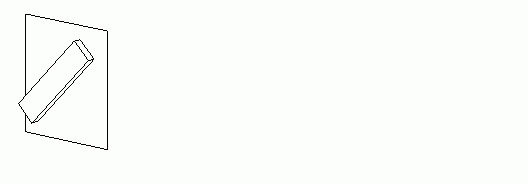
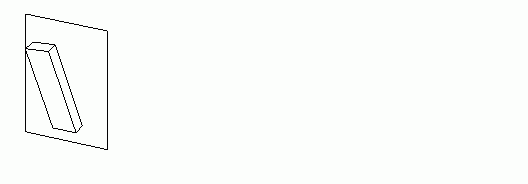
The factors that determine the colour of adhesive tape are: thickness (Fig.4), orientation (Fig.5) and inclination (Fig.6).

(thickness.gif)
Fig.3
(orientation.gif)
Fig.4
(inclination.gif)
Fig.5


Setup for further inquiry

There are numerous factors that determine what colour we will see. So far this material focuses on one of those. It is planned to be further developed to include all of them.

From now on, perform experiments in such a setup, that you have the polariser in a parallel(transmissive) position with regard to the monitor, and the tape turned so that the colours are most intense.

Why such a setup?

Why such a setup?

In scientific inquiry it is a good idea to focus on only one contributing factor to an effect at a time. There are many factors that determine the colour we see in adhesive tape. Using the suggested configuration exposes thickness and eliminates the effect of others.

You may have noticed that changing the orientation of the investigated item and/or the analyser, you get positions, where the adhesive tape is uniformly transparent (against a white or black background). In this position, obviously, thickness has no effect on colours. It is then reasonable to suspect that in a position where colours are most visible, the effect of thickness is the greatest.

This is not necessarily true, but it is a reasonable setup to start from.

Close

The model

Now it is time to determine the relationship between thickness and colour. Once this is determined, you will be offered suggestions on how to test it.

You have noticed that in the mentioned setup, adhesive tape appears coloured. You can see this again. By clicking on the "Blank" button, you will see a blank screen.

Blank

How would you proceed? (Write important words.)

Excellent

It appears you plan to proceed by viewing the effect against a background of one of the basic colours (red, green or blue).

This is an excellent way to proceed.
Proceed

Good

You seem to be thinking about using colours, but it is not clear which ones or if they are the best ones. Think of it some more and retry. Should you not be entirely successful again, the program will allow you to proceed.
Proceed Retry

Retry

It appears that you have not found the best way to proceed, or the program does not recognize your key words.

Try again. Think of how we see colours and how the monitor produces them. Then think about what would have to happen to get different colours from white. Keep in mind that this white comes from the monitor, not from the sun.
Retry

Not successful

It appears that you still have not found the best way to proceed, or the program does not recognize your key words.

You may choose to try again or proceed.

If you try again, think about this: all the colours we see are various combinations of the three basic colours (red, green and blue). So what colour we see is determined by how much of each of them is present in the light that comes to our eyes.
Proceed Retry

How to proceed

Since the monitor produces all colours by mixing the three basic colours, each colour is determined by how much of each of the basic colours is present. So, if one blocks all red from white, the result would be a green-blue mix, called cyan. If one blocks a little of green, too, the colour will be darker and more blue than green.
So if we know, how much of each of the basic colours is present at each thickness, we can calculate the resulting colour with any program that can mix colours in the RGB scheme (e.g. Paint).
It would be therefore reasonable to proceed so, that we produce the background in each of the basic colours and see what pattern we see in the adhesive tape. That should allow us to estimate, what percentage of the original colour is transmitted through the adhesive tape at different thicknesses.

Colour backgrounds

Choose the colour of the background.

White
Red
Green
Blue
Cyan
Yellow
Magenta

What do you see?

Do you see any pattern?
(Such as the tape being bright at almost exactly every third layer, or shades changing from bright to dark repeatedly (periodically).)

Back to choosing colours

Yes, I see a pattern

No, I do not see any pattern

No pattern?

It is unusual that you would not see a pattern for any of the colours. We can not, however, exclude the possibility of such a case. We suggest that you use the most regular, probably cheapest, adhesive tape and retry, or retry with some other type.

Usually the pattern for red is most obvious. Click on the button below to learn what the pattern for red usually is, if you can not see it after several attempts.

What is usually the pattern for red?

I do not see a pattern, but proceed anyway

Back

Usual pattern for red

Usually the pattern for red is bright every two layers and dark every two layers. The shade may be less intense with every next repetition, but the pattern dark, bright, dark, bright, dark, bright, ... is usually clearly visible. Close

Pattern for red

What pattern do you see for red? Describe it in percentage of the initial brightness for each layer, for the first six layers.

1 layer:
2 layers:
3 layers:
4 layers:
5 layers:
6 layers:

Pattern for red

Can you determine what is the period of repetition for red?
(The number of layer after which the pattern is (more or less) repeated.)

Pattern for green

What pattern do you see for green? Describe it in percentage of the initial brightness for each layer, for the first six layers.

1 layer:
2 layers:
3 layers:
4 layers:
5 layers:
6 layers:

Pattern for green

Can you determine what is the period of repetition for green?
(The number of layer after which the pattern is (more or less) repeated.)

Pattern for blue

What pattern do you see for blue? Describe it in percentage of the initial brightness for each layer, for the first six layers.

1 layer:
2 layers:
3 layers:
4 layers:
5 layers:
6 layers:

Pattern for blue

Can you determine what is the period of repetition for blue?
(The number of layer after which the pattern is (more or less) repeated.)

Hint about the period

Keep in mind, that this can be a real number. There is no reason, why the pattern should repeat after exactly, for example, three layers. It could be 3.2 and then the pattern in the next repetition would not be exactly the same as the previous, but rather a little brighter, a little darker or half brighter, half darker. Back

Hint about the period

Try plotting the values in a coordinate frame with number of layers in the horizontal direction and transmissivity in vertical.

Try to draw a periodic curve (such as a sinusoid) that goes through all the plotted points.

Assume that the peaks are all the same height and if points are lower, they are probably not exactly at the peak.

The period of this function is the period you are looking for.

Back

The model

Determine a rule that connects number of layers (or thickness) to transmissivity (how much light passes through). The rule you determine is called a model.

A model must be written so that it enables you to make predictions (like calculate which colour you will see at 7 layers (or more).

Use all that you have discovered so far to build your model.

A little help, please.

How to build a model

You should have noticed, that the pattern is periodic. You have also determined the periods.

There is a number of mathematical functions that are periodic. For example, sine and cosine alternate between 1 and -1, with, of course, 0 in between.

Using mathematics is not necessary. You can determine the rule as a pattern: e.g. 0, 0.5, 0.5, 0, 1, and then repeat.

Using what you already know from previous observations, you should try to extend this knowledge to not yet observed phenomena (layers above 7, perhaps). This attempt is called a hypothesis and it does not have to be correct. That is why you will test it. If it doesn't work, you can make another one. If it does wotk, you have succeeded in phenomenologically describing the phenomenon.

Close

Testing the model

You have determined a model to calculate the colours.

You can now test it.

The next slide will provide a number of options to calculate and display a colour, based on values of red, green and blue. This values must be imputed by you (the user) or calculated from a model (if it is in the form of an equation/formula). The program will then display the colour.

How do you test a model?

How to test a model

The rule (model) must be formulated so that you can make predictions from it. According to the model at some thickness a certain amount of each basic light should be transmitted. That is something you must be able to determine from the model.

Testing it means, finding a way to draw the colour that the model predicts and comparing it to the actual colour that appears in the real experiment.

Proceed

Test

To test the hypothesis, one might calculate all three basic colours for each thickness and then use a program that can mix colours (e.g. Paint). This is very, very time consuming. There are ways to write a program, that can display all the colours for various thickneses at once.

We wrote a program in MS Excel. It's up-side is that the formula is written in an Excell cell, so any user, familiar with Excel, can change it. It's down-side is that MS Excel is not freeware and that the file uses macros to display the resulting colours (which means, you have to enable macros in Excel to use it). At this time it has not been tested on OpenOffice.org Calc.

We wrote another program using HTML and JavaScript. Its up-side is that it only uses internet technologies, so it can be viewed and used in any contemporary browser. Its down-side is that the formula to calculate the colours is written in the JavaScript code, so, first of all, it is the correct one, and second of all, to change it, one must change the code itself.

The safest and most reliable way is to combine the two. We wrote an Excel file that calculates the colour values based on equations that can be entered in Excel in the usual way. Then it generates HTML code that the user has to copy to a text editor (like Notepad, not Word) and save as *.html. The html file then displays the colours. There are no macros here and OpenOffice.org Calc can probably also be used instead of Excel (not tested).


End

Congratulations!

You have come to the end of what we have prepared. We encourage you to continue exploring this and any other phenomenon you may encounter.

Finish

Blank

Red

Green

Blue

Magenta

Cyan

Yellow

Polarisation device

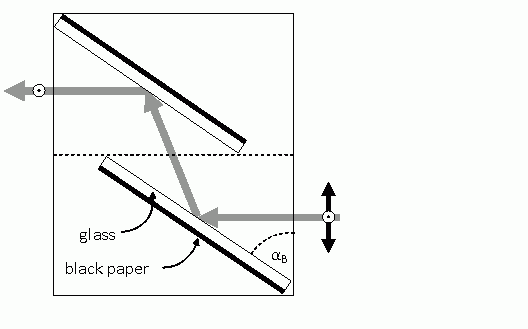
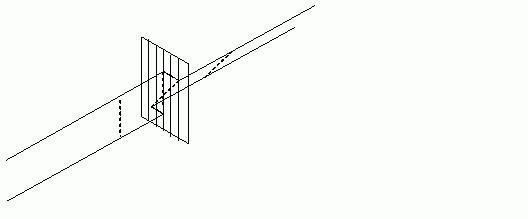
You can construct your own polarisation device. This device uses Brewster's angle to achieve polarisation.

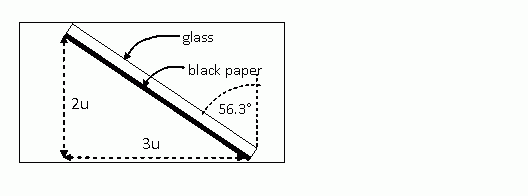
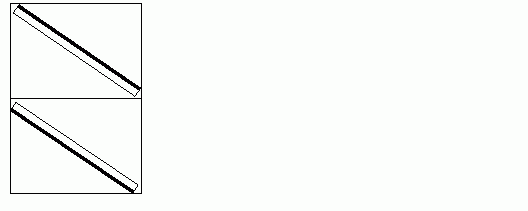
Use two pieces of glass or a piece of glass and a (small) mirror. Cover the glass (both if you have two) on one side with black paper or some other matt black material that absorbs most of the light (e.g. cloth). Position the glass pieces in a periscope configuration (see Figure 1). Make sure that the angle of both pieces with the incident direction is 34° (90° minus Brewster's angle, which is 56° for glass). Fix the position of the pieces. You may construct a cardboard box (see Figure 2) or glue them on a surface (see Figure 2). Do not use adhesive tape.

(angle.gif)
opis slike
(periscope.gif)
opis slike
(brewster.gif)
opis slike

Back

RGB colour scheme

The sensors for colour vision in our eyes (called rods) are of three types. One is most sensitive to red, one to green and one to blue light. Mixing various amounts of each of these colours of light produces all the colours we can see. Displays exploit this by using the so called RBG colour scheme. RGB stands for Red, Green and Blue. Monitors can emit light with only those colours and mixing them in various amounts produces all the colours they appear to emit. If one looks closely (perhaps with a lens) at a monitor (TV displays are better for this purpose because they have bigger pixels), one can see that each pixel is made of three parts: one red, one green and one blue. To play with colour mixing, use a drawing program (e.g. Paint) and define your own colour. Values of red, green and blue for that colour will be displayed somewhere, usually in values ranging from 0 to 255, 0 being none of that colour and 255 being the most of that colour.

So, what you need to know here is: the only colours that the monitor actually produces are red, green and blue. To achieve, for example, yellow, it mixes red and green, so yellow is not really yellow, but is red and green together.

Back

Polarisation

Polarisation is a property of light that is successfully used in LCD monitors. It is the basic principle by which they turn on and off pixels. We will compare polarisation to wood in this explanation. The wood analogy will be written in <span style="color:brown">brown</span>.

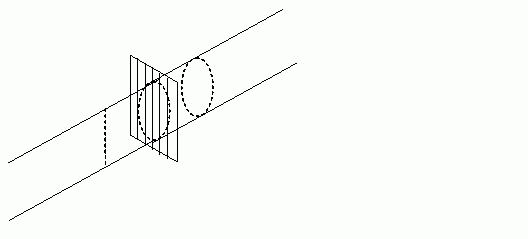
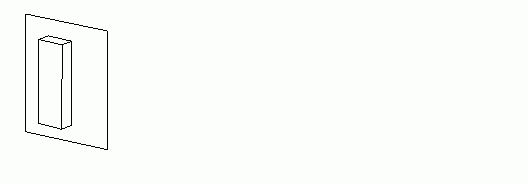
For purposes of this investigation, we may imagine each ray of light as having a circular shape (<span style="color:brown">a trunk</span>. Such light is non-polarised or circularly polarised. A polarisation device can be imagined as a device containing one slit per ray (<span style="color:brown">two parallel blades</span>). So every ray that passes through a polarisation device is transformed from having a circular shape to having a linear shape (from a cylinder to a thin strip, <span style="color:brown">from a trunk to a plank</span>). Such light is said to be linearly polarised. If this light now passes through another polarisation device oriented in the same direction, nothing happens. The ray still has a linear shape (<span style="color:brown">the plank can pass right between the blades</span>). If, however, this light passes through a polarisation device orienter perpendicularly to the first, nothing passes through. <span style="color:brown">Like trying to make a plank from a plank positioned perpendicularly to the saw blades. One would get a thin rod. If the plank was really thin (like veneer), then the rod would be barely visible compared to the initial trunk.</span> The more the orientation of the second polarisation device is parallel to the first, the more light is transmitted. <span style="color:brown">The more the blades are parallel to the plank the less of the plank is cut off.</span>

(pol_krozna.gif)
opis slike
(pol_linearna.gif)
opis slike

There are devices and materials that can turn polarisation (<span style="color:brown">twist the plank</span>) or even produce circular polarisation from linear (<span style="color:brown">transforming the plank back into a trunk, or, more correctly, turning the plank about its longitudinal axis so fast that it appears to be a trunk (circularly polarised), and it behaves like a trunk for purposes of polarisation</span>).

This is only a fast glimpse at what polarisation is. We strongly recommend that you first familiarise yourself with what polarisation really is and then return to this material, so you can make full use of your knowledge to form a correct model.

Back

0%
0%